Tnuki vs Clay

A daily brief replaces the recipe you keep running

Tnuki turns one chat into a daily list of prospects worth emailing — no recipe to maintain, no Clay specialist to hire. Free, no signup.

At a glance

One
chat box
vs a column-by-column recipe
24/7
signal monitoring
vs run-on-demand recipes
Zero
specialists to hire
vs Clay specialist & GTM-engineer retainers
Free
no signup, no card
vs $167/mo entry

In short

What each tool is

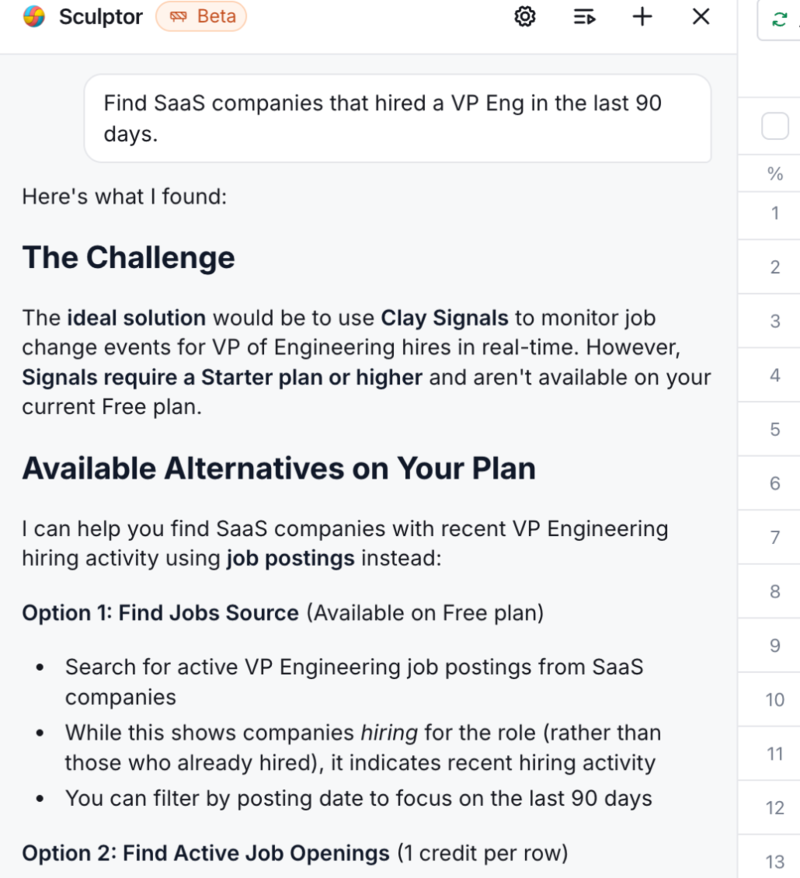
Clay is the power-user tool for building enrichment recipes. Chain 150+ providers (LinkedIn, Apollo, ZoomInfo, Hunter, OpenAI, Anthropic, custom HTTP) into a column-by-column waterfall, then run it across thousands of rows. Best-in-class if you want fine-grained control over which API runs when and what each cell costs. The complexity is real enough that companies routinely hire dedicated GTM engineers — or contract "Clay specialist" agencies on monthly retainers — just to configure and maintain the setup. Those costs sit on top of the seat license and credit budget. In 2026 they shipped Sculptor, a chat assistant pinned alongside the same Clay spreadsheet — the columns, provider chips, credit meters, and waterfall fallbacks stay on screen; Sculptor helps author the recipe but doesn't remove it. You're still inside the recipe-builder, with a co-pilot riding shotgun.

Tnuki is built for the team that just wants the answer. Type what you need in plain English; five AI agents (Intelligence, Signal, Contact/Waterfall, Drafting, Concierge) run in parallel and return a verified, drafted, ready-to-send pipeline. The signal layer monitors 1,000+ sources continuously, so instead of re-running a recipe you just open the morning brief.

The visceral moment

The same task, in both tools.

Task: Find 25 Series B SaaS companies with a new VP Engineering hired in the last 90 days. Get verified work emails. Draft outreach grounded in their funding.

Clay

Clay's spreadsheet UI showing Sculptor chat alongside columns, providers, and credit meters

Roughly 30 minutes to a few hours: Chat system is simple only on the surface. You need to learn Clay's system of credits, filters, and enrichments.

Tnuki

Find SaaS companies that hired a VP Eng in the last 90 days. Send
# Company VP Eng Drafts
1 Linear On your move to Linear
2 Vercel Welcome to Vercel
3 Retool Congrats on Retool — quick ask
4 Notion Re: your role at Notion
5 PostHog Welcome to PostHog
… 20 more rows, drafts attached

Roughly 45 seconds: one chat message returns verified prospects with personalized drafts grounded in the hire.

Side-by-side

Feature comparison

Capability Clay Tnuki What this means
Signal monitoring (intent layer) Build-your-own — wire up LinkedIn, Clearbit, custom triggers in a recipe (DIY, often the GTM-engineer's job) Built-in. 1,000+ sources, 24/7 — funding rounds, exec hires, filings, LinkedIn posts, conference talks. Source-linked. Clay's signal monitoring is a recipe you maintain (and pay a specialist to build); Tnuki's runs out of the box
Setup time 30 min with templates, hours-to-week from scratch None — type a sentence Tnuki returns prospects before Clay's first recipe column finishes
Talent required Companies routinely hire in-house GTM engineers — or contract "Clay specialist" agencies on monthly retainers — to configure and maintain recipes None — the chat is the configuration Clay's complexity has spawned its own consulting market; the talent cost sits on top of seats + credits
Interaction model Spreadsheet of enrichment columns + Sculptor chat alongside (the chat helps author; the recipe complexity stays on screen) Plain English chat Clay tables are versioned artifacts you keep tuning; Tnuki has no recipe behind the chat
Buying signals You wire signal sources via custom HTTP / job-change webhooks 1,000+ sources monitored 24/7, included Tnuki: signal layer is built-in, not a recipe you assemble
Recurring intelligence Run or schedule the recipe Daily brief delivered to inbox Tnuki: passive overnight monitoring vs. on-demand recipe runs
Drafting Sequencer add-on (paid plans) for email campaigns Drafting agent included free Tnuki drafts are grounded in the actual buying trigger
Pricing model Dual credit ledger — Data Credits + Actions Free at usable limits Tnuki: no credit budgeting per cell or workflow step
Free tier 100 credits + 500 actions/month, signup required Access for free, no signup, no credit card Tnuki: more permissive free tier
Custom API integrations Best-in-class — custom HTTP, MCP, 150+ providers Curated waterfall (no custom HTTP today) Clay wins for highly custom enrichment chains
Learning curve Clay University, 700+ templates, 15K-member Slack None — chat is self-teaching Tnuki: zero curriculum, no community to keep up with

The honest answer

Which tool is right for you?

Choose Clay if…

Choose Tnuki if…

Pricing

What each tool costs

Clay

Free $0 100 credits + 500 actions/mo · no credit card · 200 rows/table
Launch $167–185/seat/mo annual / monthly · 2,500 credits + 15K actions
Growth $446–495/seat/mo annual / monthly · 6K credits + 40K actions · custom HTTP
Enterprise Custom (~$30K–$154K/yr) 100K+ credits + 200K+ actions · SSO, RBAC, dedicated CSM

Snapshot as of April 2026. Clay overhauled pricing in March 2026 to a dual Data Credits + Actions ledger. Verify current rates at clay.com/pricing.

Tnuki

Free at usable limits — full access to chat plus recurring Plays.

No signup, no credit card, no sales call.

Paid plans (higher volume, daily Plays) launch in 2026 with public pricing.

Frequently asked

Common questions about Tnuki vs Clay

Is Tnuki actually free, or is there a catch?
Tnuki is free at usable limits — full access to chat and recurring Plays. No signup, no credit card, no sales call. Paid tiers (higher volume, daily Plays) launch in 2026 with public pricing.
Can Tnuki replace Clay for me?
For most teams running trigger-based outreach: yes. Tnuki replaces the prospecting, enrichment, and drafting layers Clay provides. For highly custom enrichment chains — connecting your own HTTP APIs, chaining MCP servers, doing per-cell cost optimization across 150+ providers — Clay still wins. Many teams keep Clay for their power-user enrichment workflows and add Tnuki for the daily Plays.
What about Clay's Sculptor — isn't that the same as Tnuki's chat?
Sculptor is a chat assistant pinned alongside the same Clay spreadsheet UI — the columns, provider waterfalls, credit meters, and recipe versioning are still right there on your screen, and you're still managing them. The chat helps you draft and edit columns faster; it doesn't hide the underlying machinery. With Tnuki, the chat IS the answer — there's no spreadsheet of columns and credits to manage in parallel. Sculptor is a co-pilot for Clay's recipe builder. Tnuki removes the recipe entirely.
Does Tnuki have as many enrichment providers as Clay?
Clay has 150+ providers and lets you chain custom HTTP. Tnuki has a curated multi-provider waterfall (HunterMail, LeadMagic, FindyMail, Prospeo) tuned for highest deliverability — no per-cell cost management on your end. For teams optimizing cost-per-cell or chaining proprietary APIs, Clay's flexibility is a real advantage. For teams that just want verified contacts at high deliverability, Tnuki's curated waterfall ships out of the box.
Do I need to hire a Clay specialist or GTM engineer to set up Clay?
Many teams do. Clay's complexity — chaining providers, tuning waterfalls, managing credits, debugging when a recipe stops returning data — has spawned a cottage industry of "Clay specialists" and Clay-certified consultants. Agencies and freelancers commonly charge multi-thousand-dollar monthly retainers to configure and maintain Clay setups, on top of the seat license and credit costs. Some teams hire dedicated in-house GTM engineers for the same job. With Tnuki, the chat is the configuration; there's no recipe to set up, so there's nothing for a specialist to manage.
Does Tnuki integrate with Salesforce or HubSpot?
Not natively yet — current options are CSV export and Zapier. Native CRM sync is on the 2026 roadmap. Clay's native CRM and data warehouse sync is genuinely better today; if that's mission-critical, weigh it heavily.
Can I use both Clay and Tnuki together?
Yes, and many teams do. Common pattern: Tnuki for the morning Plays (priority accounts, trigger-grounded drafts), Clay for high-volume sequenced enrichment of CRM-resident accounts using custom waterfall recipes. Tnuki's drafts can feed straight into Clay's Sequencer.
What about data privacy and GDPR?
Tnuki retrieves only public information (LinkedIn, company sites, news, regulatory filings) via licensed APIs. No scraped private data, no purchased lists. Contact verification happens through GDPR-compliant providers, same vendor pool Clay uses for its waterfalls.
Why would I switch from Clay to Tnuki?
Three reasons: (1) Tnuki gives you full agent access at no cost; Clay's free tier caps at 100 credits + 500 actions per month before you're on a $167+/mo paid plan, (2) Tnuki returns prospects in one chat message vs Clay's recipe-building or template-tuning flow, (3) Tnuki's signal layer monitors continuously — you review and send from your recommended Plays instead of running a workflow. If you live in Clay's Sequencer or chain custom APIs, that's a different story; see the Choose Clay if section.

Try Tnuki for free.

No signup. No credit card. Type a sentence, get prospects.

Get my prospects

See other comparisons:

Tnuki vs Apollo Tnuki vs ZoomInfo Tnuki vs SciLeads Tnuki vs 11x Tnuki vs Artisan

Reveal your ideal prospects.

Find your ideal prospects in under a minute for free.